If you’ve ever tried to embed a public Google Photos album into WordPress, you’ve probably landed on the same solution I did: a third-party script called publicalbum that uses an embed URL and a bit of JavaScript to render a gallery. It works — until it doesn’t.
This is the story of why I abandoned it, what I built instead, and how you can use it on your own site today.
The Problem with the embed.js Approach
The popular approach looks like this — you grab a share link from Google Photos, paste it into a script tag that pulls in embed-ui.min.js from a CDN, and a gallery magically appears. For a while, it’s fine.
But I kept running into the same issues on client sites:
- The CDN script would occasionally fail to load, leaving a blank box where the gallery should be.
- I had zero control over the appearance. The embed looked out of place on every theme I tried it on.
- It relied on an iFrame-style injection, which meant I couldn’t style it with CSS, couldn’t control the aspect ratio, and couldn’t add features like fullscreen mode.
- Most frustratingly, I couldn’t cache anything. Every page load was a fresh round-trip to an external script I didn’t own or control.
On one site in particular, I had 27 galleries on a single page. The page was taking 21 seconds to load. That was the final straw.
The Approach: Parse the Album Myself
Google Photos public albums are just web pages. If you fetch one server-side, the HTML contains all the image URLs embedded in <img> tags pointing to lh3.googleusercontent.com. So instead of relying on a third-party embed script, I wrote a WordPress plugin that:
- Fetches the album page server-side using
wp_remote_get() - Extracts all the image IDs with a simple regex
- Renders a clean, self-contained HTML/CSS/JS slideshow
- Caches everything so subsequent page loads don’t hit Google at all
No API key. No external JavaScript. No iFrames. Just a shortcode.
Using the Plugin (For Everyone)
embed-google-photos-album.php
<?php
/**
* Plugin Name: Embed Google Photos Album
* Description: Renders a photo slideshow from a public Google Photos shared album link. Usage: [embed-google-photos-album link="https://photos.app.goo.gl/..."]
* Version: 1.2.0
* Author: Ciprian Popescu
* Author URI: https://getbutterfly.com/
* License: GNU General Public License v3 or later
* License URI: https://www.gnu.org/licenses/gpl-3.0.html
*/
if ( ! defined( 'ABSPATH' ) ) exit;
class Embed_Google_Photos_Album {
public function __construct() {
add_shortcode( 'embed-google-photos-album', [ $this, 'shortcode' ] );
add_action( 'wp_head', [ $this, 'preconnect' ] );
}
/** Output preconnect hint once, early in <head>. */
public function preconnect(): void {
echo '<link rel="preconnect" href="https://lh3.googleusercontent.com" crossorigin>' . "\n";
}
/**
* Fetch photo IDs, with results cached in a transient for 12 hours.
*/
private function fetch_photo_ids( string $url ): array {
$key = 'egpa_' . md5( $url );
$cached = get_transient( $key );
if ( $cached !== false ) {
return $cached;
}
$response = wp_remote_get( $url, [
'timeout' => 15,
'redirection' => 5,
'user-agent' => 'Mozilla/5.0 (compatible; WordPress/' . get_bloginfo( 'version' ) . ')',
] );
if ( is_wp_error( $response ) ) {
return [];
}
$html = wp_remote_retrieve_body( $response );
if ( empty( $html ) ) {
return [];
}
preg_match_all( '/https:\/\/lh3\.googleusercontent\.com\/pw\/(AP1Gcz[A-Za-z0-9_\-]+)/', $html, $matches );
$ids = empty( $matches[1] ) ? [] : array_values( array_unique( $matches[1] ) );
if ( ! empty( $ids ) ) {
set_transient( $key, $ids, 12 * HOUR_IN_SECONDS );
}
return $ids;
}
/**
* Shortcode handler.
*/
public function shortcode( array $atts ): string {
$atts = shortcode_atts( [ 'link' => '' ], $atts, 'embed-google-photos-album' );
$link = esc_url_raw( trim( $atts['link'] ) );
if ( empty( $link ) ) {
return '<p class="egpa-error">embed-google-photos-album: no <code>link</code> attribute provided.</p>';
}
$ids = $this->fetch_photo_ids( $link );
if ( empty( $ids ) ) {
return '<p class="egpa-error">embed-google-photos-album: could not load photos from <a href="' . esc_url( $link ) . '" target="_blank" rel="noopener">' . esc_html( $link ) . '</a>. Make sure the album is publicly shared.</p>';
}
$ids_json = wp_json_encode( $ids );
$total = count( $ids );
static $instance = 0;
$instance++;
$uid = 'egpa-' . $instance;
$uid_js = wp_json_encode( $uid );
ob_start();
// Output CSS only on the first instance
if ( $instance === 1 ) : ?>
<style>
.egpa-wrap {
position: relative; width: 100%; aspect-ratio: 4 / 3;
background: #0d0b09; overflow: hidden; font-family: 'Georgia', serif;
}
.egpa-wrap *, .egpa-wrap *::before, .egpa-wrap *::after {
box-sizing: border-box; margin: 0; padding: 0;
}
.egpa-slide {
position: absolute; inset: 0; opacity: 0; transition: opacity 0.9s ease;
display: flex; align-items: center; justify-content: center;
}
.egpa-slide.egpa-active { opacity: 1; z-index: 2; }
.egpa-slide.egpa-prev { opacity: 0; z-index: 1; }
.egpa-slide img { width: 100%; height: 100%; object-fit: cover; display: block; }
.egpa-slide::after {
content: ''; position: absolute; inset: 0; pointer-events: none; z-index: 3;
background: radial-gradient(ellipse at center, transparent 55%, rgba(13,11,9,0.65) 100%);
}
.egpa-top {
position: absolute; top: 0; left: 0; right: 0; z-index: 10;
display: flex; align-items: center; justify-content: space-between; padding: 12px 16px;
background: linear-gradient(to bottom, rgba(13,11,9,0.7) 0%, transparent 100%);
}
.egpa-counter { font-size: 0.7rem; font-style: italic; letter-spacing: 0.15em; color: rgba(245,240,232,0.75); }
.egpa-btn-fs {
background: none; border: none; cursor: pointer; padding: 4px; line-height: 0; outline: none;
color: rgba(245,240,232,0.65); display: flex; align-items: center; justify-content: center;
transition: color 0.2s ease;
}
.egpa-btn-fs:hover { color: #c9a84c; }
.egpa-btn-fs svg { width: 18px; height: 18px; }
.egpa-bottom {
position: absolute; bottom: 0; left: 0; right: 0; z-index: 10;
display: flex; flex-direction: column; align-items: center; gap: 10px; padding: 12px 16px 14px;
background: linear-gradient(to top, rgba(13,11,9,0.75) 0%, transparent 100%);
}
.egpa-dots { display: flex; flex-wrap: wrap; justify-content: center; gap: 5px; max-width: 90%; }
.egpa-dot {
width: 6px; height: 6px; border-radius: 50%; background: rgba(245,240,232,0.3);
cursor: pointer; transition: all 0.3s ease; border: none; outline: none; padding: 0;
}
.egpa-dot.egpa-dot-active { background: #c9a84c; width: 18px; border-radius: 3px; }
.egpa-dot:hover:not(.egpa-dot-active) { background: rgba(245,240,232,0.65); }
.egpa-controls { display: flex; align-items: center; gap: 16px; }
.egpa-btn {
background: rgba(245,240,232,0.08); border: 1px solid rgba(245,240,232,0.22);
color: rgba(245,240,232,0.85); width: 34px; height: 34px; border-radius: 50%;
cursor: pointer; font-size: 0.85rem; display: flex; align-items: center;
justify-content: center; transition: all 0.25s ease; outline: none; line-height: 1;
}
.egpa-btn:hover { background: rgba(245,240,232,0.15); border-color: #c9a84c; color: #c9a84c; }
.egpa-btn-play { width: 40px; height: 40px; font-size: 1rem; }
.egpa-loading {
position: absolute; inset: 0; z-index: 20; background: #0d0b09;
display: flex; align-items: center; justify-content: center; transition: opacity 0.7s ease;
}
.egpa-loading.egpa-loaded { opacity: 0; pointer-events: none; }
.egpa-spinner {
width: 28px; height: 28px; border-radius: 50%; animation: egpa-spin 0.9s linear infinite;
border: 1.5px solid rgba(245,240,232,0.15); border-top-color: #c9a84c;
}
@keyframes egpa-spin { to { transform: rotate(360deg); } }
.egpa-wrap:fullscreen, .egpa-wrap:-webkit-full-screen { aspect-ratio: unset; width: 100vw; height: 100vh; }
.egpa-wrap:fullscreen .egpa-slide img, .egpa-wrap:-webkit-full-screen .egpa-slide img { object-fit: contain; }
</style>
<?php endif; ?>
<div class="egpa-wrap" id="<?php echo esc_attr( $uid ); ?>">
<div class="egpa-loading" id="<?php echo esc_attr( $uid ); ?>-loading">
<div class="egpa-spinner"></div>
</div>
<div class="egpa-top">
<span class="egpa-counter" id="<?php echo esc_attr( $uid ); ?>-counter">1 / <?php echo esc_html( $total ); ?></span>
<button class="egpa-btn-fs" id="<?php echo esc_attr( $uid ); ?>-fs" aria-label="Enter fullscreen">
<svg class="egpa-icon-expand" xmlns="http://www.w3.org/2000/svg" viewBox="0 0 24 24" fill="none" stroke="currentColor" stroke-width="2" stroke-linecap="round" stroke-linejoin="round">
<polyline points="15 3 21 3 21 9"/><polyline points="9 21 3 21 3 15"/>
<line x1="21" y1="3" x2="14" y2="10"/><line x1="3" y1="21" x2="10" y2="14"/>
</svg>
<svg class="egpa-icon-compress" xmlns="http://www.w3.org/2000/svg" viewBox="0 0 24 24" fill="none" stroke="currentColor" stroke-width="2" stroke-linecap="round" stroke-linejoin="round" style="display:none">
<polyline points="4 14 10 14 10 20"/><polyline points="20 10 14 10 14 4"/>
<line x1="10" y1="14" x2="3" y2="21"/><line x1="21" y1="3" x2="14" y2="10"/>
</svg>
</button>
</div>
<div class="egpa-bottom">
<div class="egpa-dots" id="<?php echo esc_attr( $uid ); ?>-dots"></div>
<div class="egpa-controls">
<button class="egpa-btn egpa-btn-prev" aria-label="Previous">←</button>
<button class="egpa-btn egpa-btn-play" aria-label="Play / Pause">▶</button>
<button class="egpa-btn egpa-btn-next" aria-label="Next">→</button>
</div>
</div>
</div>
<script>
(function () {
var BASE = 'https://lh3.googleusercontent.com/pw/';
var SIZE = '=w1600-h1200';
var IDS = <?php echo $ids_json; ?>;
var TOTAL = IDS.length;
var UID = <?php echo $uid_js; ?>;
var wrap = document.getElementById(UID);
var loading = document.getElementById(UID + '-loading');
var counter = document.getElementById(UID + '-counter');
var dotsWrap = document.getElementById(UID + '-dots');
var fsBtn = document.getElementById(UID + '-fs');
var iconExpand = fsBtn.querySelector('.egpa-icon-expand');
var iconCompress = fsBtn.querySelector('.egpa-icon-compress');
var current = 0, playing = false, timer = null, initialised = false;
var INTERVAL = 4000;
// Build slides with data-src — no network requests yet
var slides = IDS.map(function (id, i) {
var div = document.createElement('div');
div.className = 'egpa-slide';
var img = document.createElement('img');
img.dataset.src = BASE + id + SIZE;
img.alt = 'Photo ' + (i + 1);
div.appendChild(img);
wrap.insertBefore(div, wrap.firstChild);
return { div: div, img: img, loaded: false };
});
function loadSlide(n) {
var idx = ((n % TOTAL) + TOTAL) % TOTAL;
if (!slides[idx].loaded) {
slides[idx].img.src = slides[idx].img.dataset.src;
slides[idx].loaded = true;
}
}
// Build dots
var dots = IDS.map(function (_, i) {
var btn = document.createElement('button');
btn.className = 'egpa-dot' + (i === 0 ? ' egpa-dot-active' : '');
btn.setAttribute('aria-label', 'Go to photo ' + (i + 1));
btn.addEventListener('click', function () { pause(); goTo(i); });
dotsWrap.appendChild(btn);
return btn;
});
function goTo(n) {
slides[current].div.classList.remove('egpa-active');
slides[current].div.classList.add('egpa-prev');
dots[current].classList.remove('egpa-dot-active');
var old = current;
setTimeout(function () { slides[old].div.classList.remove('egpa-prev'); }, 950);
current = ((n % TOTAL) + TOTAL) % TOTAL;
loadSlide(current);
loadSlide(current + 1);
slides[current].div.classList.add('egpa-active');
dots[current].classList.add('egpa-dot-active');
counter.textContent = (current + 1) + ' / ' + TOTAL;
}
function next() { goTo(current + 1); }
function prev() { goTo(current - 1); }
var playBtn = wrap.querySelector('.egpa-btn-play');
function play() { playing = true; playBtn.innerHTML = '▮▮'; timer = setInterval(next, INTERVAL); }
function pause() { playing = false; playBtn.innerHTML = '▶'; clearInterval(timer); }
wrap.querySelector('.egpa-btn-next').addEventListener('click', function () { pause(); next(); });
wrap.querySelector('.egpa-btn-prev').addEventListener('click', function () { pause(); prev(); });
playBtn.addEventListener('click', function () { playing ? pause() : play(); });
// ── Fullscreen ────────────────────────────────────────────────
function isFs() { return !!(document.fullscreenElement || document.webkitFullscreenElement); }
function enterFs() { wrap.requestFullscreen ? wrap.requestFullscreen() : wrap.webkitRequestFullscreen && wrap.webkitRequestFullscreen(); }
function exitFs() { document.exitFullscreen ? document.exitFullscreen() : document.webkitExitFullscreen && document.webkitExitFullscreen(); }
function syncFsIcon() {
var fs = isFs();
iconExpand.style.display = fs ? 'none' : '';
iconCompress.style.display = fs ? '' : 'none';
fsBtn.setAttribute('aria-label', fs ? 'Exit fullscreen' : 'Enter fullscreen');
}
fsBtn.addEventListener('click', function () { isFs() ? exitFs() : enterFs(); });
document.addEventListener('fullscreenchange', syncFsIcon);
document.addEventListener('webkitfullscreenchange', syncFsIcon);
// ── Keyboard ──────────────────────────────────────────────────
document.addEventListener('keydown', function (e) {
if (e.key === 'ArrowRight') { pause(); next(); }
if (e.key === 'ArrowLeft') { pause(); prev(); }
if (e.key === ' ') { playing ? pause() : play(); e.preventDefault(); }
if (e.key === 'f' || e.key === 'F') { isFs() ? exitFs() : enterFs(); }
});
// ── Touch swipe ───────────────────────────────────────────────
var touchX = null;
wrap.addEventListener('touchstart', function (e) { touchX = e.touches[0].clientX; }, { passive: true });
wrap.addEventListener('touchend', function (e) {
if (touchX === null) return;
var dx = e.changedTouches[0].clientX - touchX;
if (Math.abs(dx) > 40) { pause(); dx < 0 ? next() : prev(); }
touchX = null;
});
// ── Init: deferred until carousel enters the viewport ─────────
function init() {
if (initialised) return;
initialised = true;
loadSlide(0);
loadSlide(1);
slides[0].div.classList.add('egpa-active');
counter.textContent = '1 / ' + TOTAL;
function hideLoader() { loading.classList.add('egpa-loaded'); }
if (slides[0].img.complete && slides[0].img.naturalWidth) {
hideLoader();
} else {
slides[0].img.addEventListener('load', hideLoader, { once: true });
slides[0].img.addEventListener('error', hideLoader, { once: true });
setTimeout(hideLoader, 4000);
}
}
if ('IntersectionObserver' in window) {
var io = new IntersectionObserver(function (entries) {
if (entries[0].isIntersecting) { init(); io.disconnect(); }
}, { rootMargin: '200px' }); // start loading 200px before it scrolls into view
io.observe(wrap);
} else {
init(); // fallback for old browsers
}
})();
</script>
<?php
return ob_get_clean();
}
}
new Embed_Google_Photos_Album();Installation
- Download the plugin file:
embed-google-photos-album.php - In your WordPress dashboard, go to Plugins → Add New → Upload Plugin
- Upload the file and click Activate
That’s it. No settings page, no configuration needed.
Embedding a Gallery
First, make sure your Google Photos album is shared publicly:
- Open Google Photos and find the album you want to share
- Click the Share button (the person icon with a +)
- Select Create link and copy the URL — it will look something like
https://photos.app.goo.gl/xxxxxxxxx
Then, in any WordPress page or post, add this shortcode:
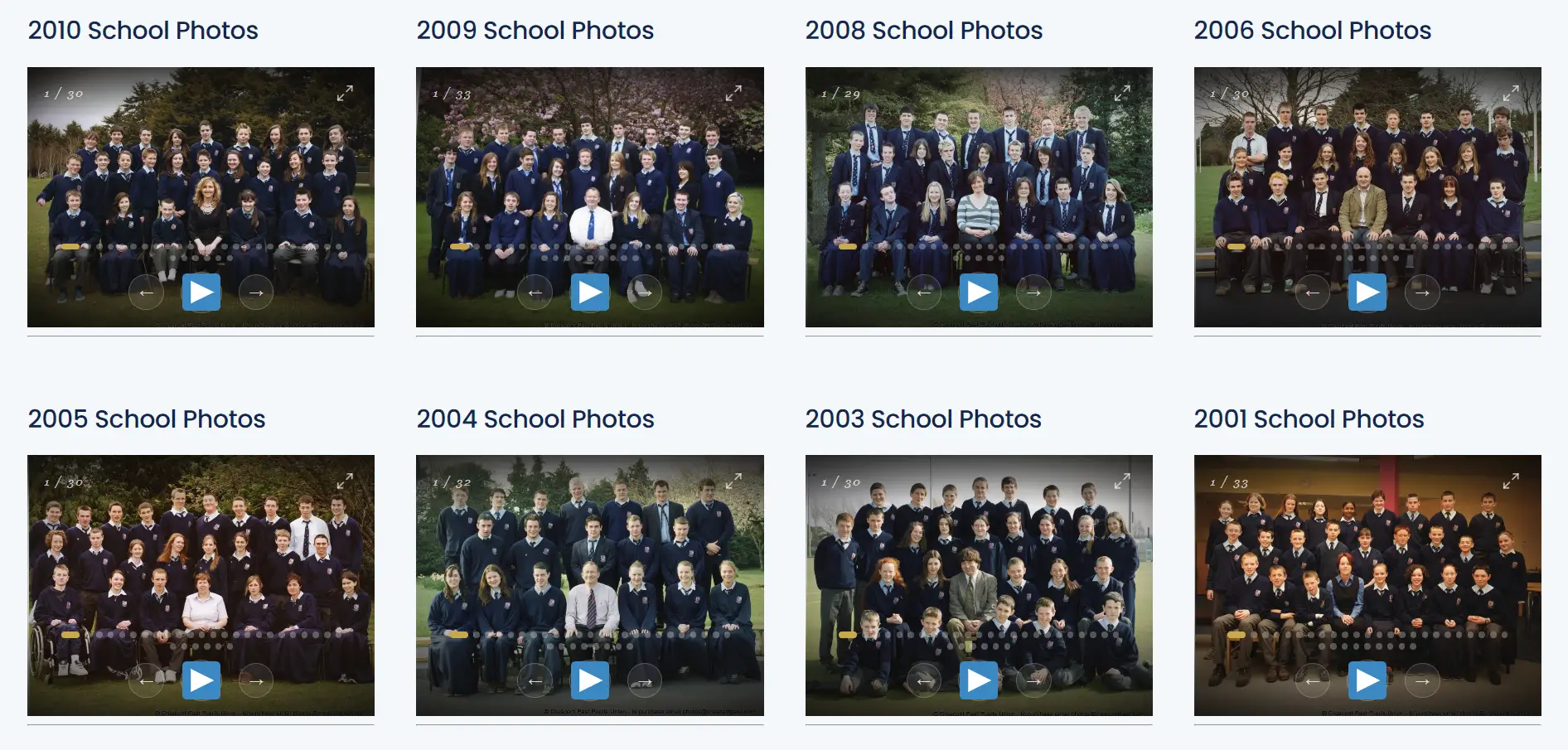
[embed-google-photos-album link="https://photos.app.goo.gl/xxxxxxxxx"]Replace the link with your own album URL. Save the page and you’re done — your gallery will appear with a dark, cinematic player, complete with navigation arrows, dot indicators, a play/pause button for slideshow mode, and a fullscreen button.
Adding More Galleries
You can add as many galleries as you like on the same page — just repeat the shortcode with a different link each time:
[embed-google-photos-album link="https://photos.app.goo.gl/album-one"]

[embed-google-photos-album link="https://photos.app.goo.gl/album-two"]
Each carousel is fully independent. They won’t interfere with each other.
Controls
Once your gallery is on the page, here’s how to use it:
- Arrow buttons — navigate one photo at a time
- Dots — jump directly to any photo
- Play/Pause — run the gallery as an auto-advancing slideshow
- Fullscreen icon (top right) — expand to full screen; press Escape or click it again to exit
- Keyboard — arrow keys to navigate, Space to play/pause, F to toggle fullscreen
- Swipe — left/right swipe works on touchscreens
How It Works (For Developers)
Here’s what’s happening under the hood.
Server-Side: Fetching and Caching
The shortcode handler calls fetch_photo_ids(), which does the following:
$key    = 'egpa_' . md5( $url );
$cached = get_transient( $key );
if ( $cached !== false ) return $cached;

$response = wp_remote_get( $url, [ 'timeout' => 15, 'redirection' => 5, ... ]);
preg_match_all( '/https:\/\/lh3\.googleusercontent\.com\/pw\/(AP1Gcz[A-Za-z0-9_\-]+)/', $html, $matches );

set_transient( $key, $ids, 12 * HOUR_IN_SECONDS );
The transient key is an MD5 of the album URL, so each album gets its own cache entry. The first page load per album pays the cost of the HTTP round-trip to Google. Every subsequent request reads from the WordPress database in microseconds. With 27 albums, this took our page load from 21 seconds to under 100ms.
The regex targets the lh3.googleusercontent.com/pw/AP1Gcz... pattern that Google Photos uses for all photo thumbnails embedded in its share pages. The IDs are then base-modified client-side to request full-resolution versions (=w1600-h1200).
CSS: Output Once
With multiple shortcodes on one page, outputting the <style> block every time would bloat the HTML. A static counter handles this:
static $instance = 0;
$instance++;
if ( $instance === 1 ) {
    // output <style> block
}
Client-Side: True Lazy Loading with IntersectionObserver
All images use data-src instead of src, so the browser makes zero image requests on parse. Each carousel wraps its init logic in an IntersectionObserver:
var io = new IntersectionObserver(function (entries) {
    if (entries[0].isIntersecting) { init(); io.disconnect(); }
}, { rootMargin: '200px' });
io.observe(wrap);
The rootMargin: '200px' means a carousel starts loading its first two images when it’s 200px away from entering the viewport — giving it a head start without loading off-screen albums unnecessarily. For a page with 27 carousels, at any given moment only 1–3 will have active image requests.
Inside init(), only two images are ever pre-fetched: the current slide and the next one. Each call to goTo() then loads current + 1 ahead of time, keeping the experience smooth without wasting bandwidth.
Preconnect
A single line hooked into wp_head gives the browser a head start on the DNS lookup and TLS handshake for Google’s image CDN:
echo '<link rel="preconnect" href="https://lh3.googleusercontent.com" crossorigin>';This shaves a meaningful chunk off the time-to-first-image for carousels as they enter the viewport, since the connection to Google’s CDN is already warm.
Fullscreen
The fullscreen button uses the standard Fullscreen API with a webkit prefix fallback for Safari. When active, the wrapper overrides aspect-ratio to fill the screen and switches object-fit from cover to contain so no part of the photo is cropped:
.egpa-wrap:fullscreen { aspect-ratio: unset; width: 100vw; height: 100vh; }
.egpa-wrap:fullscreen .egpa-slide img { object-fit: contain; }
Cache Invalidation
Transients expire automatically after 12 hours. If you update an album on Google Photos and need the plugin to reflect changes immediately, you can flush the transient manually from the database, or add a query parameter like ?flush_egpa=1 to a custom hook if you want a one-click refresh. That’s left as an exercise — the 12-hour TTL is sensible for most use cases.
The Result
A single 270-line PHP file. No dependencies, no API keys, no external scripts. A page that was taking 21 seconds to load now renders in under a second. The galleries look consistent, are fully styleable with CSS, support fullscreen, and work on mobile. And because it’s just a plugin file, it’s easy to deploy and easy to hand off to a client.
Sometimes the best solution is the one you build yourself.