
Repeater for Gravity Forms
Build Repeatable Form Sections in Minutes
Turn static Gravity Forms into flexible, repeatable workflows your users understand immediately.
Add once. Repeat as needed. Submit with confidence.
- tenancy and rental applications
- onboarding forms
- grant and funding applications
- staffing and HR intake
- procurement/resource requests
- event participant registration
Repeater for Gravity Forms adds repeatable field groups directly inside the form builder workflow.
You place a start marker and end marker, configure limits, and let users add/remove groups dynamically on the frontend.
No complicated runtime wiring. No custom form-by-form repeater boilerplate.
For freelancers and agencies: ship complex forms faster.
For product teams: reduce custom maintenance.
For site owners: improve completion UX for long forms.
Repeater for Gravity Forms at a Glance
Repeater for Gravity Forms is a Gravity Forms add-on that adds repeatable field groups to Gravity Forms, right inside the form builder. Mark where a group starts and ends, set minimum and maximum counts, and let visitors add or remove sections on the fly – perfect for forms that need to capture an unknown number of items like additional tenants, team members, or line items.
- Builder-native – configure repeaters where you already edit your forms, no custom code.
- Multiple repeaters per form – use more than one repeatable section in a single form.
- Customizable controls – keep the +/− icons or add labels like “Add Tenant” and “Remove Resource”.
- Wide field support – works with text, email, phone, address, date, time, dropdowns, and more.
- Production-tested – built and hardened on real client projects and compatible with modern Gravity Forms releases.
👋 Works with the latest Gravity Forms 3.1+ and WordPress 7.1+!
🧑🧑🧒🧒
Many forms need repeating groups:
- additional tenants
- extra team members
- multiple resources
- repeated contact blocks
- dependent sections that vary by user
Without a practical repeater, teams end up with:
- bloated forms,
- editor friction,
- brittle custom code,
- and inconsistent data capture.
🧩
Why teams choose it
Cleaner UX
Make complex forms easier to complete without sacrificing structure.
Builder-native workflow
Configure repeaters where your editors already work.
Production-tested behavior
Designed for real client forms and repeatable business processes.
Multiple repeaters supported
Use more than one repeater section in a single form.
Customizable controls
Keep +/- icons and add custom labels like “Add Tenant” or “Remove Resource”.
👤
Built for market fit
If you build forms for clients, this plugin solves a recurring request:
“Can users add another section like this?”
That request appears in nearly every vertical.
This plugin turns it into a configurable product feature.
🙋🏻♂️
Trust and support
Built from real implementation experience
Compatible with modern Gravity Forms releases
Active compatibility and UX improvements
| Feature | Repeater for Gravity Forms (getButterfly) | Nested Forms (Gravity Wiz) | Native Repeater (GF core, beta) | Repeater Fields (add-ons.org) |
|---|---|---|---|---|
| Price | €29/year | From $59/yr (Basic: 1 perk, 1 site) to $299/yr (Pro) | Included with GF | Free; Pro $39/yr to $299 lifetime |
| Set up in form editor, no code | Yes | Yes, but needs a separate child form | Partly: GF 3.0+ has an editor UI, switched on with a one-line filter. Before 3.0: PHP only | Yes |
| Repeats inline (no popup) | Yes | No: modal + summary table | Yes | Yes |
| Multiple repeaters per form | Yes | Yes† | Yes | Yes† |
| Nested repeaters | No | No | Yes | Not documented |
| Min / max count | Yes (plus start count) | Yes | Max only | Yes |
| Custom add/remove labels | Yes, text + HTML | Partly: button text only through a filter | Yes | Add button only (remove†) |
| Conditional logic in group | Yes: per row, and fields outside can use repeater values | Yes | No | Yes (Pro) |
| Calculations / totals | Yes: per-row calculations, sums outside the repeater, and products counted in Total and payments | Yes (:sum=, :count, :total) | No | Payment fields (Pro) |
| File uploads | Single-file only | Yes | No | Pro only† |
| Multi-page forms | No (also no AJAX, no Save & Continue) | Yes | Yes (a repeater can’t span pages) | Likely† |
| Requires | WP 6.5+, PHP 7.4+, GF 2.7+ (tested with WP 7.1, GF 3.1.2) | GF + Gravity Perks | GF 2.4+; GF 3.0+ for the editor UI | WP 3.9+, PHP 5.2+ |
| Best for | Inline “add another” groups, including priced line items | Complex parent/child data + reporting | Developers | Budget sites (3.4★ from only 5 ratings) |
If there is one feature missing from Gravity Forms, that is a field repeater section. A way to set a starting and ending point and adding fields inside a repeater. Turns out this functionality exists in Gravity Forms, but in a beta state.
| Capability Metric | Repeater for Gravity Forms (getButterfly) | Nested Forms (Gravity Wiz) |
|---|---|---|
| Display Framework | Repeats fields inline directly on the active form page. | Uses popup modal screens and summary tables. |
| Data Structure | Stores data as clean JSON payloads inside rows. | Requires building separate child forms to hold data. |
| Pricing Scale | Flat €29.00/year baseline. | Tiered models ranging from $59 to $299/year. |
👋 Hey! Did you see my Gravity Forms Date/Time Picker plugin?

Building a Better Repeater for Gravity Forms
I ship a lot of Gravity Forms projects for clients who expect flexible, repeatable field groups. For years that meant shipping my own repeater because Gravity Forms lacked one. When the official Repeater field finally arrived – in beta and still incomplete – I already had battle-tested code in production, and an inbox full of edge cases.
History
I needed a repeater for a client project, and I needed it to work with the latest release of Gravity Forms, 2.5. A great release with an overhauled UI. Still, the repeater functionality is not there. As I had one week to implement his functionality, I started my coding adventure. Based on several tutorials, some code snippets and an old WordPress plugin, I cobbled together a fully working* plugin. As seen in the screenshots below, I have styled the repeater fields differently, in order to make them stand out. For a long and complex form, it might get confusing pretty quickly.
* For my specific scenario.
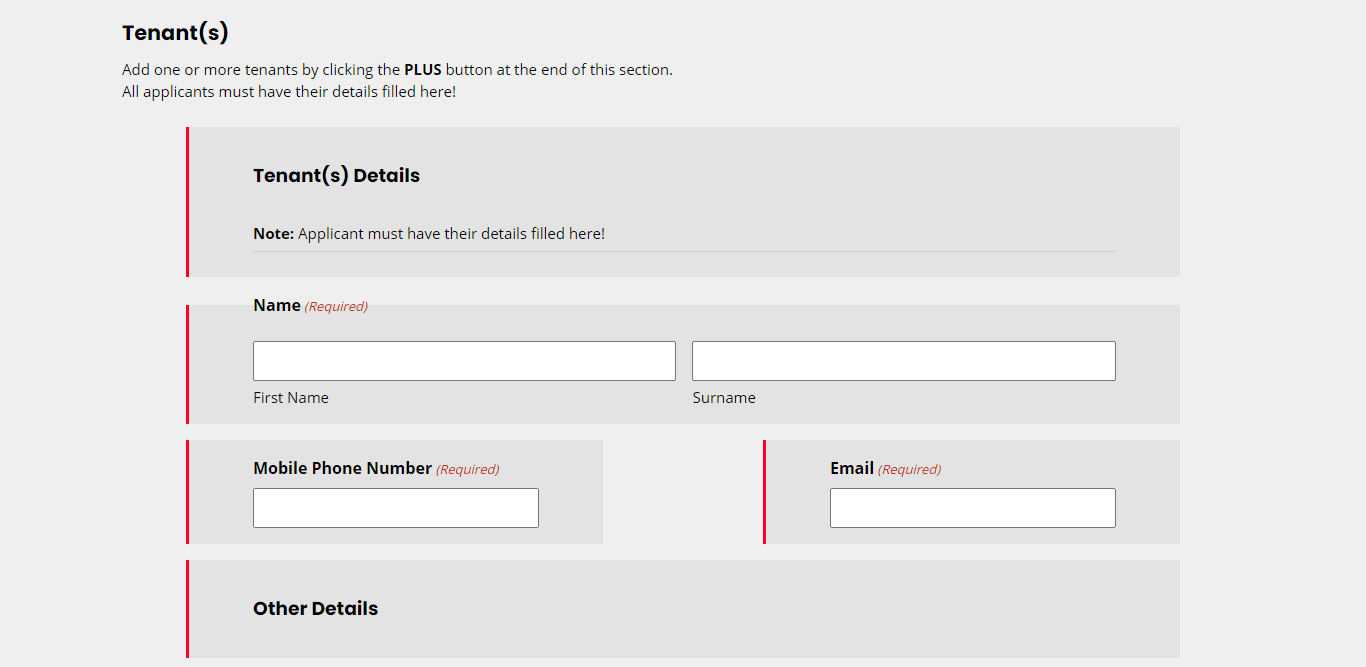

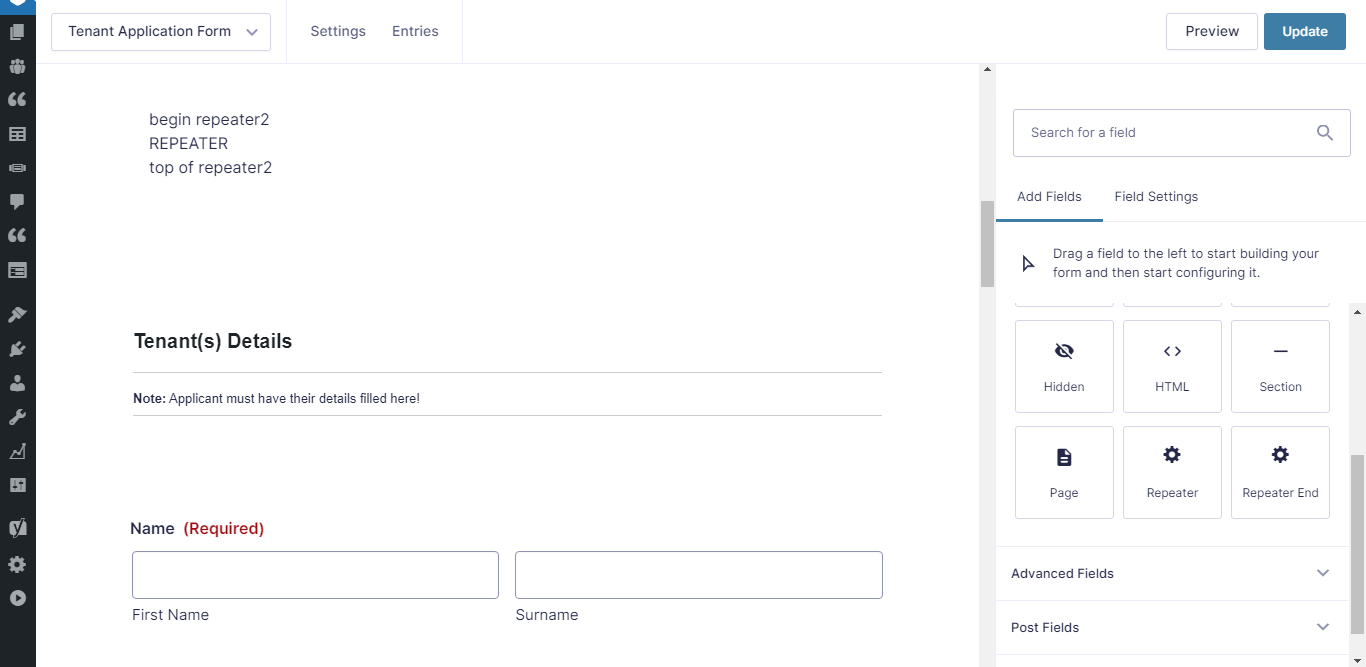
.gform_wrapper.gravity-theme div.gf_repeater2_child_field,
.gform_wrapper.gravity-theme fieldset.gf_repeater2_child_field {
    margin: 0 64px;
    padding: 16px 64px;
    border-left: 3px solid #ff002b;
    background-color: rgba(0, 0, 0, 0.05);
}
Supported Repeater Fields
- Address
- Checkboxes
- Date
- Drop Down
- Hidden
- HTML
- MultiSelect
- Name
- Number
- Paragraph Text
- Phone
- Radio
- Section
- Single Line Text
- Time
- Website
Repeater Features
- Repeat groups of fields multiple times
- Use multiple repeaters on the same form
- Use shortcodes to display data to the user
- Use JavaScript to manipulate the repeater
- Customize the add and remove button’s HTML
- Use Gravity Forms pre-populate hooks and filters like normal
- Supports conditional logic
Versioned Fixes and Lessons Learned
Building a repeater field is more than cloning DOM nodes. The last few releases were driven by real support tickets and production logs, and every fix made the plugin more resilient.
JavaScript Stability
Early adopters hit JavaScript errors whenever a child field was missing metadata. I hardened the setup routine to validate every object before accessing it, bootstrapping sane defaults and logging parse errors instead of crashing the form. This refactoring removed the dreaded “Cannot read properties of undefined” error and made the repeater recover gracefully when editors drag unsupported fields into the group.
Tenancy Application Form: A Real-World Stress Test
I built a full tenancy application form to hammer the edge cases. The structure looks like this:
- A primary applicant section outside the repeater
- A repeater that captures 1–5 additional occupants
- Nested fields for employment status, income, references, and uploads
- Conditional logic to show or hide follow-up questions
Testing that flow uncovered everything from date picker reinitialization to multi-field validation. Because editors configure the repeater right in the form builder, they can change copy, tweak field requirements, and export the form like any other Gravity Forms project. No PHP edits required.
Implementation Notes for Your Projects
If you plan to ship repeaters today, here are the practices I follow:
- Clamp the counts: Always set sensible min and max values in the repeater settings, so validation rules stay predictable.
- Audit child fields: Avoid unsupported field types until you’ve tested them in staged environments. Repeater for Gravity Forms covers the common ones – address, date, time, uploads, conditional sections – but I still smoke-test anything exotic from third-party add-ons.
- Disable AJAX intentionally: Repeater for Gravity Forms does this for you, but if you switch to the official field, remember it still needs non-AJAX submissions for now.
- Keep notifications simple: Use the repeater merge tags that Gravity Forms provides. Repeater for Gravity Forms formats the payload for you, but I still log representative entries to confirm email templates match client expectations.
- Version everything: Each fix in this plugin bumped the version in
repeater2-for-gravity-forms.php. Keep changelogs so you can explain upgrades to maintainers and customers.
What’s New (Latest Updates)
- Compatibility improvements for modern Gravity Forms 3+ workflows.
- Hardened repeater child mapping and form editor save behavior.
- Better frontend stability for dynamic cloned fields.
- Improved entry and merge-tag output formatting.
- Improved time value formatting in repeater outputs.
- Improved file-upload display handling in repeated groups.
- Add/Remove controls can now include optional label text:
Add Button TextRemove Button Text- Add/Remove controls now render as real
<button type="button">elements. - Additional CSS hardening for Gravity Forms theme reset behavior.
Changelog
View Changelog
= 2.2.5 =
* Fixed: the repeater only showed its "Begin/End Repeater" placeholder when the form was loaded through admin-ajax.php (e.g. NitroPack's Gravity Forms integration).

= 2.2.4 =
* Added: per-row calculations inside a repeater; formulas outside the repeater receive the sum of all rows.
* Added: pricing fields inside a repeater count towards the Total field (and its validation), order summaries and payment add-ons, one line per row.
* Added: conditional logic outside the repeater can use fields inside it.
* Fixed: International (formatted) Phone fields now work in added rows and show the formatted number in entries.
* Fixed: Enhanced UI drop-downs now work in every row.
* Fixed: fields hidden by conditional logic in a row were still validated and saved.
* Fixed: conditional logic inside rows stopped working correctly after removing a row.
* Fixed: conditional logic inside rows compared checkbox and radio labels instead of their values.
* Fixed: fields with similar ids were mixed up in added rows (for example checkbox choice 1 and choice 10).
* Updated: uses `get_value_save_input()` on Gravity Forms 3.0+, as `get_value_save_entry()` is deprecated.
* Tested with WordPress 7.1 and Gravity Forms 3.1.2.
* Fixed: adding a row threw a JavaScript error on Gravity Forms 3.x when the repeater contains a Date field with a datepicker.
* Fixed: the datepicker calendar did not open in added rows on Gravity Forms 3.x.
* Fixed: input masks were applied twice in the first row and used the wrong digit rule in added rows.
* Fixed: single-file uploads are now validated and saved to the Gravity Forms upload folder (previously the file was discarded and a broken link was stored).
* Fixed: required File Upload fields inside a repeater always failed validation.
* Fixed: repeater values are now escaped on the entry detail screen.
* Fixed: layout spacers in the form editor caused a JavaScript error when saving the form.
* Fixed: fields with "Hidden" visibility inside a repeater became visible after a failed validation.

= 2.2.3 =
* Fixed: Time fields now save the hour, minute and AM/PM of each row separately instead of merging rows.
* Fixed: multi-file upload fields in added rows now get their own uploader, so the Browse button works.

= 2.2.2 =
* Raised the requirements to WordPress 6.5 and PHP 7.4.
* Fixed the plugin's Update URI.

= 2.2.1 =
* Security hardening: direct file access guards, escaped output, sanitized request data and WordPress Coding Standards clean-up across all PHP files.
* Refactored the form editor script.
* Updated the button styles.

= 2.2.0 =
* Added "Add Button Text" and "Remove Button Text" settings to the Repeater End field.
* Restyled the add and remove buttons.
* Added the bundled jQuery Mask plugin for input masks in repeated rows.
* Added automatic updates from getButterfly.com.
* The form editor now saves repeater settings through the `gform_pre_form_editor_save` filter instead of rewriting the Update button.
* Fixed repeater detection in the form editor when a form has more than one repeater.
* Removed the debug mode.
* Tested with WordPress 7.0.

= 2.1.6 =
* Covers the unreleased 2.1.2 to 2.1.5 builds.
* Repeater data is now stored as JSON (WordPress 6.8 compatibility); older serialized entries are still read.
* Added File Upload field support in repeated rows.
* Time fields are shown as HH:MM in entries and notifications.
* Improved datepicker and time field re-initialisation in added rows.
* Fixed JavaScript errors caused by missing or malformed repeater data.
* Raised the minimum Gravity Forms version to 2.7.

= 2.1.1 =
* Removed unused CSS and the SCSS source.

= 2.1.0 =
* WordPress Coding Standards clean-up (added phpcs.xml).
* Removed the legacy 1.0.5 entry upgrade routine and the debug mode.
* Raised the minimum Gravity Forms version to 2.5.
* Tested with WordPress 6.1.

= 2.0.6 =
* Fixed checkboxes and radio buttons in repeated rows being ticked regardless of their value when restored or pre-populated (thanks @Kaaly).

= 2.0.5 =
* Fixed a PHP warning when reading conditional logic data (thanks @webaware).

= 2.0.4 =
* Fixed the repeater initialising more than once when a form is rendered again (thanks @jeslenbucci).

= 2.0.3 =
* Added conditional logic to the Repeater and Repeater End fields (thanks @Kcharle).

= 2.0.2 =
* The plugin is now maintained by getButterfly; updated the plugin, author and GitHub URIs.

= 2.0.1 =
* Added the licence header and reformatted the main plugin file.

= 2.0.0 =
* First release of this fork of Kodie Grantham's Gravity Forms Repeater Add-On.
FAQ
Can I use multiple repeaters in one form?
Yes.
Can I nest repeaters?
No.
Can I customize + and – controls?
Yes. You can customize:
- Add HTML
- Remove HTML
- Add Button Text
- Remove Button Text
Is it useful for long forms?
Yes. It reduces clutter and keeps repeated data organized.
Is this suitable for client projects?
Yes. It is designed for practical deployment, not just demos.
Requirements
- WordPress 7.1+
- Gravity Forms 3.1+
- PHP 8.0+
Tested against the current releases of Gravity Forms 3.1 and WordPress 7.1.
Installation
- Upload the plugin folder to
/wp-content/plugins/. - Activate the plugin in WordPress.
- In the Gravity Forms editor, add:
Repeater(start)- your child fields
Repeater End
Related
- Repeater for Gravity Forms – Release Story – why and how the plugin was built
- Gravity Forms Date/Time Picker – add a date and time picker to your forms
- All WordPress plugins by getButterfly