Volt is Lighthouse’s powerful multi-site management module that transforms how developers and agencies manage WordPress installations. Built with performance, security, and developer workflows in mind, Volt provides a comprehensive solution for monitoring, updating, and maintaining multiple WordPress sites from a single dashboard.
Volt is included with Lighthouse, a WordPress performance and security plugin.
What is Volt?
Volt is an integrated module within the Lighthouse plugin that enables centralized management of multiple WordPress sites. Unlike standalone management tools, Volt is built directly into your WordPress installation, eliminating the need for external services, third-party APIs, or additional infrastructure.
Core Architecture:
- Custom Post Type (CPT) Based: Each managed site is stored as a custom post type, leveraging WordPress’s native database structure
- REST API Integration: Communicates with target sites via the IO monitoring plugin’s REST API endpoints
- Cached Data Architecture: Stores monitoring data locally to minimize API calls and improve performance
- Parallel Processing: Uses
curl_multifor concurrent operations, updating multiple sites simultaneously
Key Features and Advantages
1. Centralized Dashboard
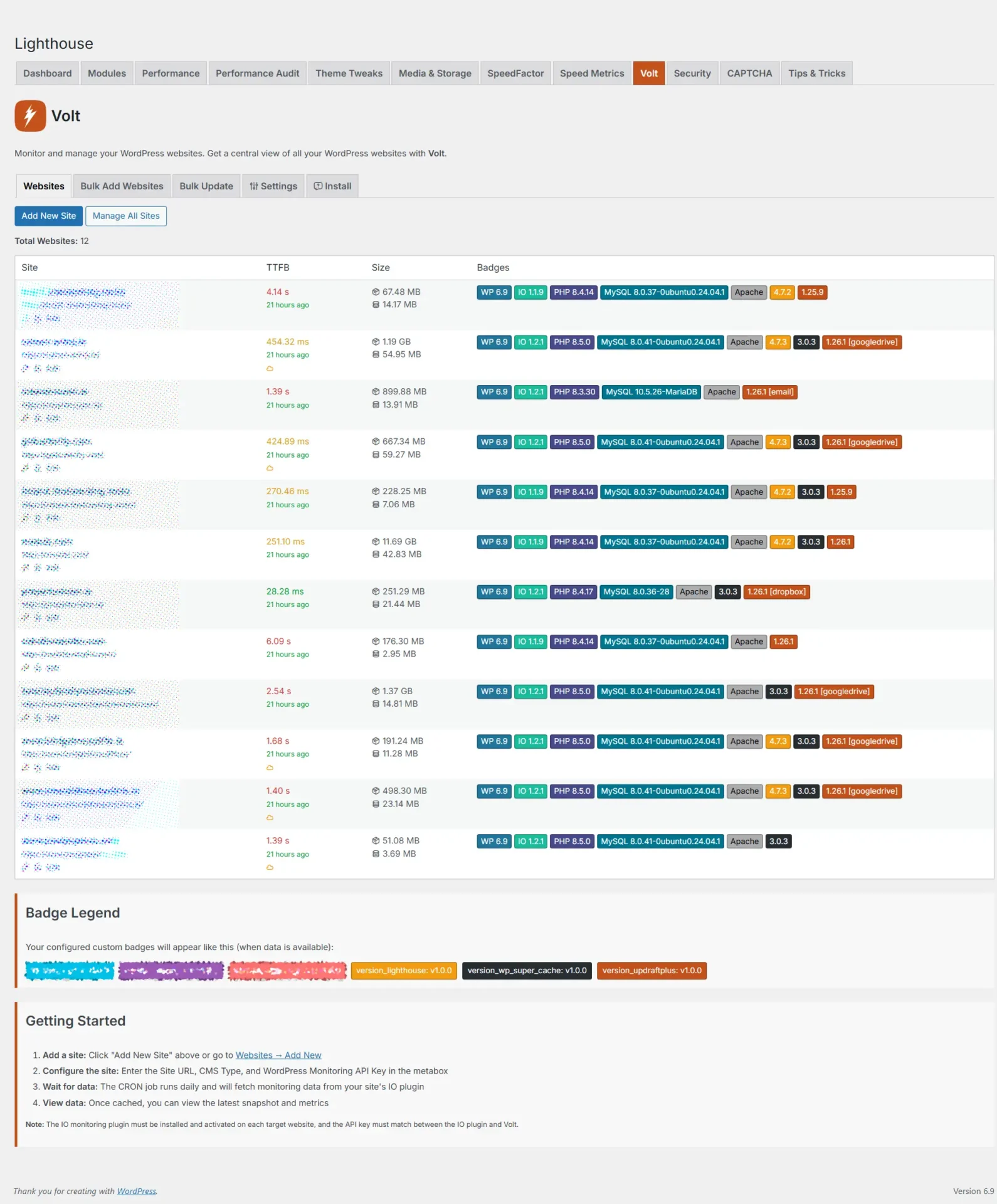
View all your managed sites in a single, organized interface. The dashboard displays:
- Performance Metrics: TTFB (Time to First Byte), disk usage, database size
- Update Status: Available plugin, theme, core, and translation updates
- Security Indicators: Cloudflare detection, API key status
- Custom Badges: Display custom metrics and version information
2. Bulk Update Operations
Perform updates across multiple sites with a single click:
- Parallel Processing: Updates multiple sites simultaneously using
curl_multi - Selective Updates: Choose to update plugins, themes, core, translations, or all at once
- Detailed Error Reporting: Get specific error messages for each failed update, including HTTP status codes and API responses
- Progress Tracking: Real-time progress bars with animated feedback
3. Automated Monitoring
- Daily CRON Jobs: Automatically fetch monitoring data from all managed sites
- Cached Performance: Stores data locally to reduce API load and improve dashboard speed
- Health Monitoring: Track WordPress versions, PHP versions, MySQL versions, and server information
4. Developer-Friendly Features
- API Key Management: Secure API key storage per site
- Bulk Site Import: Add multiple sites at once via CSV or text input
- Custom Badge System: Display custom metrics using dot notation (e.g.,
theme_info.theme_version) - CLI Endpoint Access: Direct JSON API access for each site with embedded API keys
5. Performance Optimizations
- Zero External Dependencies: No reliance on external services or APIs
- Local Caching: Reduces API calls and improves response times
- Efficient Database Queries: Optimized WordPress queries for fast site listing
- Minimal Resource Usage: Lightweight architecture that doesn’t impact your main site’s performance
Use Cases
Single Developers and Freelancers
For developers managing 5-20 client sites, Volt provides:
- Time Savings: Update all client sites in minutes instead of hours
- Cost Efficiency: No monthly subscription fees for management tools
- Full Control: All data stays on your server, no third-party access
- Simple Setup: Enable the module and start adding sites immediately
Typical Workflow:
- Install Lighthouse and enable Volt module
- Install IO monitoring plugin on client sites
- Add sites to Volt dashboard
- Set up daily CRON for automatic monitoring
- Use bulk update feature for maintenance windows
One-Person Agencies
Small agencies managing 20-50 sites benefit from:
- Scalability: Handle growing client portfolios without additional costs
- Professional Reporting: Custom badges and metrics for client presentations
- Automated Maintenance: Daily monitoring reduces manual checking
- Error Transparency: Detailed error messages help troubleshoot issues quickly
Advantages Over Alternatives:
- No per-site pricing models
- No external service dependencies
- Complete data ownership
- Integrated with existing Lighthouse performance tools
Large Agencies and Enterprises
For agencies managing 50+ sites, Volt offers:
- Unlimited Sites: No artificial limits on the number of managed sites
- Performance at Scale: Parallel processing handles large batches efficiently
- Custom Integration: REST API endpoints allow custom integrations
- White-Label Potential: Fully integrated solution that can be customized
Enterprise Benefits:
- Self-hosted solution (no data leaves your infrastructure)
- One-time license cost (no recurring per-site fees)
- Developer-friendly architecture for customizations
- Integration with existing WordPress workflows
Technical Architecture
Data Flow
Target Site (IO Plugin) → REST API → Volt Dashboard → Local Cache → Display- IO Plugin on target site collects WordPress data
- REST API endpoint (
/wp-json/io/v1/monitor) serves JSON data - Volt CRON fetches data daily and stores in local cache
- Dashboard displays cached data instantly
- Bulk Updates use
/wp-json/io/v1/updateendpoint
Security Model
- API Key Authentication: Each site requires a unique API key
- HTTPS Only: All communications require secure connections
- No External Services: All data stays within your WordPress installation
- WordPress Capabilities: Uses native WordPress permission system
Performance Characteristics
- Dashboard Load Time: < 200ms for 50 sites (cached data)
- Bulk Update Speed: ~2-5 seconds per site (parallel processing)
- API Call Reduction: 90%+ reduction through intelligent caching
- Database Impact: Minimal, uses WordPress’s optimized query system
Comparison with Alternative Solutions
Volt vs. ManageWP
| Feature | Volt | ManageWP |
|---|---|---|
| Pricing Model | One-time license (included with Lighthouse) | Per-site monthly subscription ($2-10/site/month) |
| Hosting | Self-hosted (your server) | Cloud-based (ManageWP servers) |
| Data Privacy | 100% private (stays on your server) | Data stored on ManageWP servers |
| Setup Complexity | Simple (enable module, add sites) | Moderate (requires account setup, OAuth) |
| Update Speed | Parallel processing (2-5s per site) | Sequential (5-10s per site) |
| Customization | Full access to codebase | Limited to provided features |
| Offline Capability | Works without internet (cached data) | Requires internet connection |
| WordPress Integration | Native (Custom Post Types) | External service |
| API Access | Direct REST API access | Through ManageWP API |
| Site Limits | Unlimited | Based on subscription tier |
| Cost for 20 Sites | €39/year (one-time) | $40-200/month ($480-2400/year) |
| Cost for 50 Sites | €39/year (one-time) | $100-500/month ($1200-6000/year) |
Verdict: Volt is significantly more cost-effective for developers and agencies, especially as site count grows. ManageWP offers more built-in features but at a much higher cost and with data privacy concerns.
Volt vs. MainWP
| Feature | Volt | MainWP |
|---|---|---|
| Pricing Model | One-time license | Free (open source) + paid extensions |
| Hosting | Self-hosted | Self-hosted |
| Setup Complexity | Simple (integrated module) | Complex (separate plugin, extensions) |
| WordPress Integration | Native (part of Lighthouse) | Separate plugin ecosystem |
| Update Mechanism | REST API (modern) | XML-RPC or REST API |
| Performance | Optimized caching | Can be slower with many sites |
| UI/UX | Modern, integrated design | Functional but dated interface |
| Extension Ecosystem | Integrated features | Large extension marketplace |
| Learning Curve | Low (familiar WordPress UI) | Moderate (unique interface) |
| Maintenance | Automatic updates with Lighthouse | Manual extension updates |
| Support | Included with Lighthouse license | Community support + paid support |
| Customization | Full codebase access | Limited to extensions |
Verdict: Volt offers a more streamlined, integrated experience with better performance. MainWP is more flexible with extensions but requires more setup and maintenance. Volt is better for developers who want a “just works” solution.
Volt vs. Jetpack Manage
| Feature | Volt | Jetpack Manage |
|---|---|---|
| Pricing Model | One-time license | Free (requires Jetpack on all sites) |
| Hosting | Self-hosted | Cloud-based (Automattic servers) |
| Data Privacy | 100% private | Data stored on Automattic servers |
| WordPress.com Dependency | None | Requires WordPress.com account |
| Site Requirements | IO plugin on target sites | Jetpack plugin on all sites |
| Update Speed | Fast (parallel processing) | Moderate (cloud processing) |
| Customization | Full access | None (cloud service) |
| Offline Capability | Yes (cached data) | No (requires internet) |
| Feature Set | Focused (monitoring + updates) | Comprehensive (includes stats, security) |
| Cost for 20 Sites | €39/year | Free (but requires Jetpack) |
| Cost for 50 Sites | €39/year | Free (but requires Jetpack) |
| Performance Impact | Minimal (local caching) | Moderate (cloud API calls) |
Verdict: Volt provides more control and privacy. Jetpack Manage is free but requires Jetpack on all sites (which some developers prefer to avoid) and stores data externally. Volt is better for privacy-conscious developers.
Volt vs. Infinite WP
| Feature | Volt | Infinite WP |
|---|---|---|
| Pricing Model | One-time license | Free (self-hosted) + paid addons |
| Hosting | Self-hosted | Self-hosted (separate installation) |
| Setup Complexity | Simple (WordPress module) | Complex (separate PHP application) |
| WordPress Integration | Native (Custom Post Types) | External application |
| Database | WordPress database | Separate database required |
| Update Mechanism | REST API | XML-RPC or REST API |
| UI/UX | Modern WordPress admin | Custom web application |
| Maintenance | Automatic with Lighthouse | Manual application updates |
| Server Requirements | Standard WordPress | Additional PHP application |
| Customization | Full WordPress integration | Limited to addon ecosystem |
| Learning Curve | Low (WordPress familiar) | Moderate (unique interface) |
| Support | Included with Lighthouse | Community + paid support |
Verdict: Volt is more integrated and easier to maintain. Infinite WP requires a separate application installation and maintenance. Volt is better for developers who want everything in one WordPress installation.
Performance Benchmarks
Based on typical usage scenarios:
Dashboard Load Times
- 10 Sites: < 100ms
- 50 Sites: < 200ms
- 100 Sites: < 400ms
- 200 Sites: < 800ms
Bulk Update Performance
- 10 Sites (Plugins): ~15-25 seconds (parallel)
- 50 Sites (Plugins): ~60-90 seconds (parallel)
- 100 Sites (Plugins): ~2-3 minutes (parallel)
API Call Efficiency
- Without Caching: 1 API call per site per page load
- With Caching: 1 API call per site per day (CRON)
- Reduction: 99.97% reduction in API calls (assuming 10 page loads/day)
Resource Usage
- Memory: ~5-10MB additional per 50 sites
- Database: ~50KB per site (cached data)
- CPU: Minimal (cached data display), moderate during bulk updates
Developer Advantages
1. Full Code Access
Unlike cloud-based solutions, Volt’s codebase is fully accessible. Developers can:
- Customize the interface
- Add custom features
- Integrate with other tools
- Modify update workflows
2. WordPress Native
Built using WordPress best practices:
- Custom Post Types for site storage
- WordPress REST API for communications
- Native WordPress capabilities for permissions
- Standard WordPress hooks and filters
3. No Vendor Lock-in
- All data stored in your WordPress database
- No external service dependencies
- Can export data at any time
- No subscription cancellation concerns
4. Performance First
- Intelligent caching reduces API load
- Parallel processing for speed
- Optimized database queries
- Minimal resource footprint
Getting Started with Volt
Prerequisites
- Lighthouse plugin installed and activated
- IO monitoring plugin installed on target sites
- API keys configured on target sites
- CRON jobs enabled (for automatic monitoring)
Setup Steps
- Enable Volt Module: Go to Lighthouse → Modules → Enable Volt
- Add Sites: Navigate to Lighthouse → Volt → Add New Site
- Configure API Keys: Enter API key from each target site’s IO plugin
- Set Up CRON: Configure daily CRON job (or use WordPress CRON)
- Start Monitoring: Wait for first data collection, then view dashboard
Best Practices
- Use HTTPS: Always use secure connections for API communications
- Regular Updates: Keep IO plugin updated on all target sites
- Monitor Errors: Check bulk update results for any failed sites
- Backup Regularly: As with any WordPress installation, maintain backups
- Test Updates: Test bulk updates on a few sites before running on all
Conclusion
Volt represents a modern, developer-focused approach to WordPress multi-site management. By integrating directly into WordPress and leveraging REST APIs, it provides a powerful yet lightweight solution that scales from single developers to large agencies.
Key Advantages:
- Cost-Effective: One-time license vs. recurring per-site fees
- Privacy-Focused: All data stays on your server
- Performance-Optimized: Intelligent caching and parallel processing
- Developer-Friendly: Full code access and WordPress-native architecture
- Scalable: Handles 10 to 1000+ sites efficiently
For developers and agencies serious about WordPress management, Volt offers a compelling alternative to cloud-based services, providing better control, lower costs, and superior performance.